Microservice deploy
A big challenge of deploying microservices is making sure which services should be deployed together. Often needing to click through multiple deployment pipelines to approve and roll them, or roll them back. The prdeploy app manages this through the use of a monorepo and GitHub Actions.
Monorepo setup
In the case of the monorepo for microservices, you will have multiple services in the root of the project as a folder. As you can see here with the deploy-api-test and deploy-app-test services .

Microservice builds
For each of your services you would include a my-service-build.yaml workflow that builds the artifacts you need for deployment. Each of these GitHub Action workflows should trigger based on your microservice path.
name: prdeploy-api - build

on:
  pull_request:
    types:
      - opened
      - reopened
      - synchronize
      - ready_for_review
    branches:
      - main
    paths:
      - prdeploy-api/**
      - .github/workflows/prdeploy-api-build.yaml
These builds will also have a build-details artifact to your builds that includes a build-details.json file with at least the following data:
This can be done with the greggbjensen/prdeploy/.github/actions/build-details action.
Deployment detection
As you modify code within your monorepo your pull request will automatically include checks that are those microservice builds.

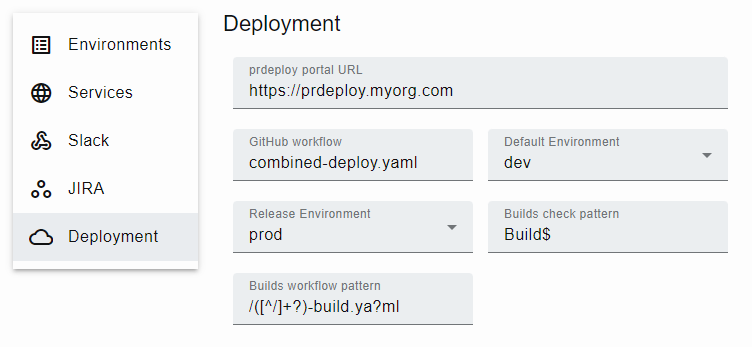
Using the Builds check pattern in Settings, prdeploy determines which checks are builds, rather than scans, linting, etc.
Combined deployment
Now that prdeploy has identified which services have changed by these checks, it can use one GitHub Actions combined-deploy.yaml workflow to deploy them.

on:
  workflow_dispatch:
    inputs:
      pull_number:
        description: 'Pull request number'
        type: string
        required: false
      environment:
        type: choice
        description: 'Deploy environment'
        options:
          - dev
          - stage
          - prod
      deploy_run_ids:
        description: 'IDs of builds to deploy'
        type: string
        required: true
      sync_run_ids:
        description: 'IDs of builds to sync'
        type: string
        required: false
      deploy_name:
        description: 'Deploy run name (automated)'
        type: string
        required: true
Environment synchronization
We want to make sure that only the services that have changed are in the current environment, and all other services match your release or production environment exactly. This is accomplished by using deploy_run_ids and sync_run_ids as inputs to the combined-deploy.yaml workflow.
The prdeploy app automatically tracks which versions of services are deployed in which environment to automatically synchronize the services you did not change and passes them in as the sync_run_ids input.

Single deployment approval
These features come together to allow your team to deploy or rollback sets of microservices within a single curated Combined deploy using your pull request comments such as /deploy prod and /rollback prod. This also provides a full history of what happened and when within the pull request.
